hi
i am trying to install pumas 2.7
this is the error i am facing,
Morning @sakshi,
Can you please provide the entire contents of that terminal panel output, it’s cut off and there’s likely useful details in there that will help with diagnosis of the problem.
Hey, thank you for your response,
so after i ran using Pumas, this is following error i got,
Precompiling Pumas…
Info Given Pumas was explicitly requested, output will be shown live
ERROR: LoadError: SystemError: opening file “C:\Users\saksh\.julia\packages\Pumas\3PP9k\src\Pumas.jl.1.11.6.jls”: No such file or directory
Stacktrace:
[1] systemerror(p::String, errno::Int32; extrainfo::Nothing)
@ Base .\error.jl:176
[2] systemerror
@ .\error.jl:175 [inlined]
[3] open(fname::String; lock::Bool, read::Bool, write::Nothing, create::Nothing, truncate::Nothing, append::Nothing)
@ Base .\iostream.jl:295
[4] open
@ .\iostream.jl:277 [inlined]
[5] open(fname::String, mode::String; lock::Bool)
@ Base .\iostream.jl:358
[6] open(fname::String, mode::String)
@ Base .\iostream.jl:357
[7] open(::typeof(Base._crc32c), ::String, ::Vararg{String}; kwargs::@Kwargs{})
@ Base .\io.jl:408
[8] open
@ .\io.jl:407 [inlined]
[9] macro expansion
@ .\loading.jl:2175 [inlined]
[10] macro expansion
@ .\lock.jl:273 [inlined]
[11] _include_dependency(mod::Module, _path::String; track_content::Bool, path_may_be_dir::Bool)
@ Base .\loading.jl:2173
[12] _include_dependency
@ .\loading.jl:2158 [inlined]
[13] #include_dependency#1109
@ .\loading.jl:2203 [inlined]
[14] include_dependency(path::String)
@ Base .\loading.jl:2202
[15] top-level scope
@ C:\Users\saksh.julia\packages\Pumas\3PP9k\src\Pumas.jl:2
[16] include
@ .\Base.jl:562 [inlined]
[17] include_package_for_output(pkg::Base.PkgId, input::String, depot_path::Vector{String}, dl_load_path::Vector{String}, load_path::Vector{String}, concrete_deps::Vector{Pair{Base.PkgId, UInt128}}, source::Nothing)
@ Base .\loading.jl:2881
[18] top-level scope
@ stdin:6
in expression starting at C:\Users\saksh.julia\packages\Pumas\3PP9k\src\Pumas.jl:1
in expression starting at stdin:6
✗ NCA
✗ NCA → NCADynamicQuantitiesExt
✗ Pumas
0 dependencies successfully precompiled in 47 seconds. 531 already precompiled.
ERROR: The following 3 direct dependencies failed to precompile:
Pumas
Failed to precompile Pumas [4f2c3c20-a4ac-11e9-067b-e5872d3484cf] to “C:\Users\saksh\.julia\compiled\v1.11\Pumas\jl_8C6B.tmp”.
ERROR: LoadError: SystemError: opening file “C:\Users\saksh\.julia\packages\Pumas\3PP9k\src\Pumas.jl.1.11.6.jls”: No such file or directory
Stacktrace:
[1] systemerror(p::String, errno::Int32; extrainfo::Nothing)
@ Base .\error.jl:176
[2] systemerror
@ .\error.jl:175 [inlined]
[3] open(fname::String; lock::Bool, read::Bool, write::Nothing, create::Nothing, truncate::Nothing, append::Nothing)
@ Base .\iostream.jl:295
[4] open
@ .\iostream.jl:277 [inlined]
[5] open(fname::String, mode::String; lock::Bool)
@ Base .\iostream.jl:358
[6] open(fname::String, mode::String)
@ Base .\iostream.jl:357
[7] open(::typeof(Base._crc32c), ::String, ::Vararg{String}; kwargs::@Kwargs{})
@ Base .\io.jl:408
[8] open
@ .\io.jl:407 [inlined]
[9] macro expansion
@ .\loading.jl:2175 [inlined]
[10] macro expansion
@ .\lock.jl:273 [inlined]
[11] _include_dependency(mod::Module, _path::String; track_content::Bool, path_may_be_dir::Bool)
@ Base .\loading.jl:2173
[12] _include_dependency
@ .\loading.jl:2158 [inlined]
[13] #include_dependency#1109
@ .\loading.jl:2203 [inlined]
[14] include_dependency(path::String)
@ Base .\loading.jl:2202
[15] top-level scope
@ C:\Users\saksh.julia\packages\Pumas\3PP9k\src\Pumas.jl:2
[16] include
@ .\Base.jl:562 [inlined]
[17] include_package_for_output(pkg::Base.PkgId, input::String, depot_path::Vector{String}, dl_load_path::Vector{String}, load_path::Vector{String}, concrete_deps::Vector{Pair{Base.PkgId, UInt128}}, source::Nothing)
@ Base .\loading.jl:2881
[18] top-level scope
@ stdin:6
in expression starting at C:\Users\saksh.julia\packages\Pumas\3PP9k\src\Pumas.jl:1
in expression starting at stdin:6
NCA
Failed to precompile NCA [29142fd5-e082-4e84-b14f-4d7220ed3f6b] to “C:\Users\saksh\.julia\compiled\v1.11\NCA\jl_6F77.tmp”.
ERROR: LoadError: SystemError: opening file “C:\Users\saksh\.julia\packages\NCA\f0i6X\src\NCA.jl.1.11.6.jls”: No such file or directory
Stacktrace:
[1] systemerror(p::String, errno::Int32; extrainfo::Nothing)
@ Base .\error.jl:176
[2] systemerror
@ .\error.jl:175 [inlined]
[3] open(fname::String; lock::Bool, read::Bool, write::Nothing, create::Nothing, truncate::Nothing, append::Nothing)
@ Base .\iostream.jl:295
[4] open
@ .\iostream.jl:277 [inlined]
[5] open(fname::String, mode::String; lock::Bool)
@ Base .\iostream.jl:358
[6] open(fname::String, mode::String)
@ Base .\iostream.jl:357
[7] open(::typeof(Base._crc32c), ::String, ::Vararg{String}; kwargs::@Kwargs{})
@ Base .\io.jl:408
[8] open
@ .\io.jl:407 [inlined]
[9] macro expansion
@ .\loading.jl:2175 [inlined]
[10] macro expansion
@ .\lock.jl:273 [inlined]
[11] _include_dependency(mod::Module, _path::String; track_content::Bool, path_may_be_dir::Bool)
@ Base .\loading.jl:2173
[12] _include_dependency
@ .\loading.jl:2158 [inlined]
[13] #include_dependency#1109
@ .\loading.jl:2203 [inlined]
[14] include_dependency(path::String)
@ Base .\loading.jl:2202
[15] top-level scope
@ C:\Users\saksh.julia\packages\NCA\f0i6X\src\NCA.jl:2
[16] include
@ .\Base.jl:562 [inlined]
[17] include_package_for_output(pkg::Base.PkgId, input::String, depot_path::Vector{String}, dl_load_path::Vector{String}, load_path::Vector{String}, concrete_deps::Vector{Pair{Base.PkgId, UInt128}}, source::Nothing)
@ Base .\loading.jl:2881
[18] top-level scope
@ stdin:6
in expression starting at C:\Users\saksh.julia\packages\NCA\f0i6X\src\NCA.jl:1
in expression starting at stdin:6
NCADynamicQuantitiesExt
Failed to precompile NCADynamicQuantitiesExt [f1f2a2c1-374b-58df-b526-d2e714f901a2] to “C:\Users\saksh\.julia\compiled\v1.11\NCADynamicQuantitiesExt\jl_841B.tmp”.
ERROR: LoadError: SystemError: opening file “C:\Users\saksh\.julia\packages\NCA\f0i6X\ext\NCADynamicQuantitiesExt.jl.1.11.6.jls”: No such file or directory
Stacktrace:
[1] systemerror(p::String, errno::Int32; extrainfo::Nothing)
@ Base .\error.jl:176
[2] systemerror
@ .\error.jl:175 [inlined]
[3] open(fname::String; lock::Bool, read::Bool, write::Nothing, create::Nothing, truncate::Nothing, append::Nothing)
@ Base .\iostream.jl:295
[4] open
@ .\iostream.jl:277 [inlined]
[5] open(fname::String, mode::String; lock::Bool)
@ Base .\iostream.jl:358
[6] open(fname::String, mode::String)
@ Base .\iostream.jl:357
[7] open(::typeof(Base._crc32c), ::String, ::Vararg{String}; kwargs::@Kwargs{})
@ Base .\io.jl:408
[8] open
@ .\io.jl:407 [inlined]
[9] macro expansion
@ .\loading.jl:2175 [inlined]
[10] macro expansion
@ .\lock.jl:273 [inlined]
[11] _include_dependency(mod::Module, _path::String; track_content::Bool, path_may_be_dir::Bool)
@ Base .\loading.jl:2173
[12] _include_dependency
@ .\loading.jl:2158 [inlined]
[13] #include_dependency#1109
@ .\loading.jl:2203 [inlined]
[14] include_dependency(path::String)
@ Base .\loading.jl:2202
[15] top-level scope
@ C:\Users\saksh.julia\packages\NCA\f0i6X\ext\NCADynamicQuantitiesExt.jl:2
[16] include
@ .\Base.jl:562 [inlined]
[17] include_package_for_output(pkg::Base.PkgId, input::String, depot_path::Vector{String}, dl_load_path::Vector{String}, load_path::Vector{String}, concrete_deps::Vector{Pair{Base.PkgId, UInt128}}, source::Nothing)
@ Base .\loading.jl:2881
[18] top-level scope
@ stdin:6
in expression starting at C:\Users\saksh.julia\packages\NCA\f0i6X\ext\NCADynamicQuantitiesExt.jl:1
in expression starting at stdin:6
this is ss, hope this helps!!
The issue I see here is that Pumas 2.7.0 requires using Julia 1.11.5, but the version of Julia being run in that REPL is 1.11.6.
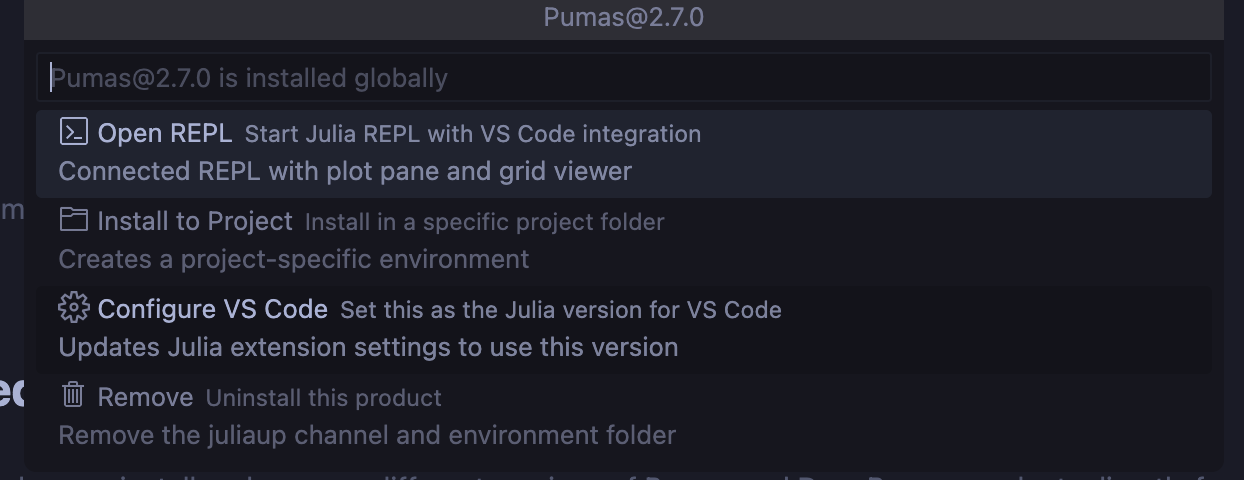
Had you configured 2.7.0 as the default? During initial installation this should have been presented as an option, perhaps it was skipped. To do this after installation click on the “List Versions” button on the Getting Started page, then click on “Pumas 2.7.0” (it should say it’s already installed), then click “Configure VS Code”, then click “Set Globally” in the dialog that shows up in the bottom right side of the window. See below for the expected menu items you should see on each of those steps.
After doing this close and reopen VS Code just to make sure the changes have take effect.
If 1.11.6 is still what gets shown in the REPL when launching after the above is tried then please check whether the VS Code settings page contains the right settings. Use Ctrl+Shift+P to open the command pallet, then type “user settings json” and click the first option in the list. This will open the VS Code configuration file. Find the line that contains "julia.executablePath": and then let me know what the entire line contains. Ideally it should be "julia.executablePath": "julia +Pumas@2.7.0",. If not then please let me know and we can get on a debugging call to work out the specifics.
i followed the steps
it is showing “julia.executablePath”: “julia +Pumas@2.7.0”
still im getting julia 1.11.6
juliaup status* is set next to julia 1.11.7 or 1.11.6 or something else? It has to be set to Pumas@2.7.1 or Pumas@2.7.0 , whichever one you installed.juliaup default Pumas@2.7.1juliaup status again and now the `*` should be beside Pumas..can you open a powershell that is not in VSCode, so go to the windows menu and open powershell. Could you please type julia there and that should start 1.11.7. If that is the version that loads, then you can try using Pumas in the > julia prompt there. When the prompt to enter the license comes in there, try entering the license. The crash associated with julia when you are tyring to use VSCode is probably only in that environment. If you are able to successfully include a license in the powershell, then you can start using Pumas in VSCode. If this does not work, then we can get on a short call to troubleshoot
I tried using powershell it is showing 1.11.5
I even downloaded the julia 1.11.7 from julia website
can you show me your juliaup status result here pleas
ok. So you have Pumas 2.7.0. In the powershell, now if you run
juliajulia starts, using Pumas - what do you get? Is it asking to install license? If so, paste in your license key there.Follow the instructions here Pumas Installation Error through VS Code - #6 by vijay
Once you enter the license key, then you at least have Pumas activated. Then you can update 2.7.1 by following the documentation
How do I update julia from 1.11.5 to 1.11.7?
you are not updating julia, you need to update Pumas to get the latest julia version
A post was split to a new topic: Error during the Pumas installation